
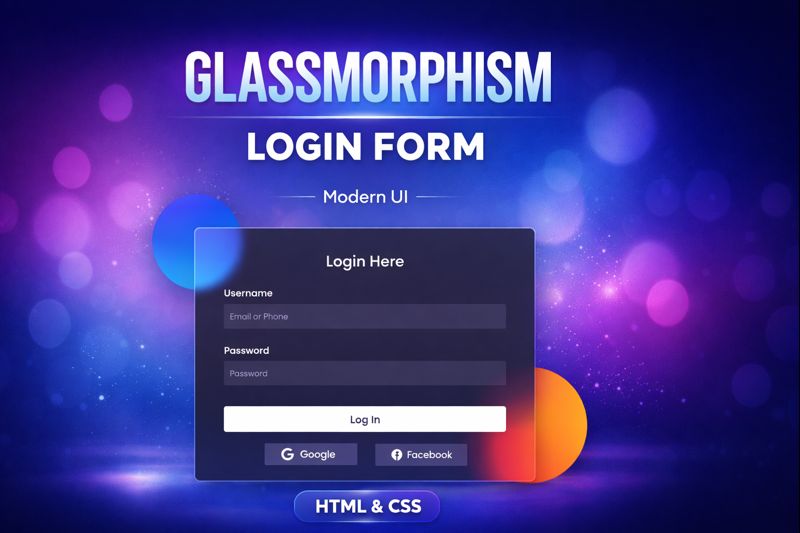

In this tutorial, you’ll learn how to create a Glassmorphism Login Form using pure HTML & CSS.
We’ll design a modern, frosted-glass style login UI with blur effects, transparency, and smooth styling—perfect for modern websites and portfolios.
✨ What you’ll learn:
- Glassmorphism UI design principles
- CSS
backdrop-filter& blur effects - Transparent cards with gradients
- Responsive login form layout
- Clean & modern HTML CSS structure
This tutorial is beginner-friendly and does not require JavaScript.
👍 If you like modern UI designs, don’t forget to Like, Share & Subscribe!
HTML:
Create a HTML file and add the following code:
<div class="background">
    <div class="shape"></div>
    <div class="shape"></div>
  </div>
  <form>
    <h3>Login Here</h3>

    <label for="username">Username</label>
    <input type="text" placeholder="Email or Phone" />

    <label for="password">Password</label>
    <input type="password" placeholder="Password" />

    <button>Log In</button>
    <div class="social">
      <div class="go">
        <i class="fab fa-google"></i>  Google
      </div>
      <div class="fb">
        <i class="fab fa-facebook"></i>  Facebook
      </div>
    </div>
  </form>
CSS:
Create a CSS file and add the following code:
*, *:before, *:after{
  padding: 0;
  margin: 0;
  box-sizing: border-box;
}
body{
  background-color: #080710;
}
.background{
  width: 430px;
  height: 520px;
  position: absolute;
  transform: translate(-50%,-50%);
  left: 50%;
  top: 50%;
}
.background .shape{
  height: 200px;
  width: 200px;
  position: absolute;
  border-radius: 50%;
}
.shape:first-child{
  background: linear-gradient(
    #1845ad,
    #23a2f6
  );
  left: -80px;
  top: -80px;
}
.shape:last-child{
  background: linear-gradient(
    to right,
    #ff512f,
    #f09819
  );
  right: -30px;
  bottom: -80px;
}
form{
  height: 520px;
  width: 400px;
  background-color: rgba(255,255,255,0.13);
  position: absolute;
  transform: translate(-50%,-50%);
  top: 50%;
  left: 50%;
  border-radius: 10px;
  backdrop-filter: blur(10px);
  padding: 50px 35px;
  border: 2px solid rgba(255,255,255,0.1);
  box-shadow: 0 0 40px rgba(8,7,16,0.6);
}
form *{
  font-family: 'Poppins',sans-serif;
  color: #ffffff;
  letter-spacing: 0.5px;
  outline: none;
  border: none;
}
form h3{
  font-size: 32px;
  font-weight: 500;
  line-height: 42px;
  text-align: center;
}
label{
  display: block;
  margin-top: 30px;
  font-size: 16px;
  font-weight: 500;
}
input{
  display: block;
  height: 50px;
  width: 100%;
  background-color: rgba(255,255,255,0.07);
  border-radius: 3px;
  padding: 0 10px;
  margin-top: 8px;
  font-size: 14px;
  font-weight: 300;
}
::placeholder{
  color: #e5e5e5;
}
button{
  margin-top: 50px;
  width: 100%;
  background-color: #ffffff;
  color: #080710;
  padding: 15px 0;
  font-size: 18px;
  font-weight: 600;
  border-radius: 5px;
  cursor: pointer;
}
.social{
  margin-top: 30px;
  display: flex;
}
.social div{
  background: red;
  width: 150px;
  border-radius: 3px;
  padding: 5px 10px 10px 5px;
  background-color: rgba(255,255,255,0.27);
  color: #eaf0fb;
  text-align: center;
}
.social div:hover{
  background-color: rgba(255,255,255,0.47);
}
.social .fb{
  margin-left: 25px;
}
.social i{
  margin-right: 4px;
}
Script:
<link rel="stylesheet" href="https://cdnjs.cloudflare.com/ajax/libs/font-awesome/5.15.4/css/all.min.css" />
<link rel="stylesheet" href="https://fonts.googleapis.com/css2?family=Poppins:wght@300;500;600&display=swap" />
glassmorphism #loginform #htmlcss #uidesign #webdesign #frontend #cssdesign #moderndesign #glassui
Happy coding!