
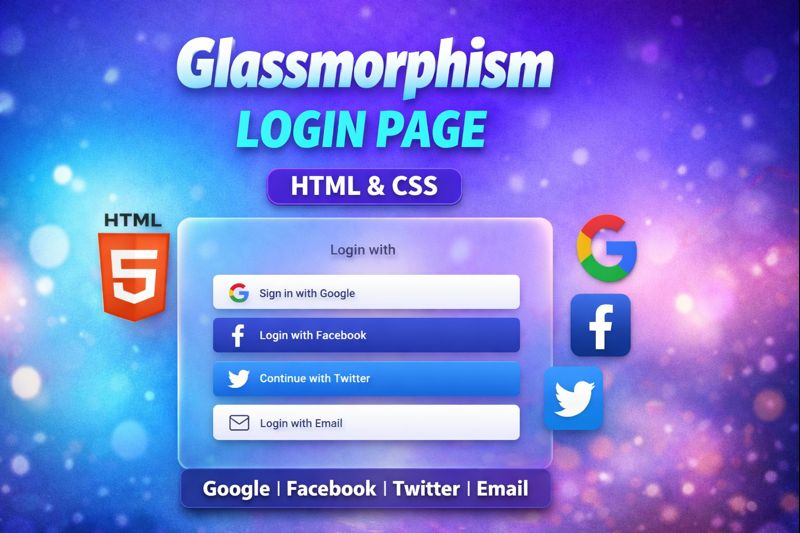

Create a modern Glassmorphism Login Page UI using pure HTML & CSS with Google, Facebook, Twitter, and Email login buttons.
This tutorial focuses on clean UI design, blur effects, transparency, and responsive layout—perfect for beginners and frontend developers.
💎 What you’ll learn in this video:
- Glassmorphism UI design using CSS
- Social login button UI (Google, Facebook, Twitter, Email)
- Modern login page layout
- Responsive and clean frontend design
- Best practices for login UI design
⚠️ Note: This video covers UI design only, not OAuth backend integration.
📌 Perfect for:
- Frontend developers
- UI/UX designers
- HTML CSS beginners
- Modern web design lovers
👍 Like | 💬 Comment | 🔔 Subscribe for more UI designs!
HTML:
Create a HTML file and add the following code:
<img class='background-img' src='https://codewithubes.in/cloud-images/bg.jpg' />
<div class='card-wrapper'>
  <h1 class='call-to-action'>Login</h1>
  <form>
    <div class='field'>
      <label for='username'>Username</label>
      <br />
      <i class='bx bx-user'></i>
      <input type='text' id='username' name='username' placeholder='Type your username' spellcheck='false' />
    </div>
    <div class='field'>
      <label for='pwd' name='pwd'>Password</label>
      <br />
      <i class='bx bx-lock-alt'></i>
      <input type='password' id='pwd' name='pwd' placeholder='Type your password' />
    </div>
    <a href=''><span>Forgot password?</span></a>
    <input type='submit' id='login-button' value='LOGIN' />
  </form>
  <div class='alternate-logins'>Or Sign Up Using
    <div class='social-links'>
      <i class='bx bxl-google' title='Google'></i>
      <i class='bx bxl-facebook' title='Facebook'></i>
      <i class='bx bxl-twitter' title='Twitter'></i>
      <i class='bx bx-envelope-open' title='Email'></i>
    </div>
  </div>
</div>
CSS:
Create a CSS file and add the following code:
*{
  margin:0;
  padding:0;
  font-family: serif;
  box-sizing: border-box;
}
.background-img{
  width: 100vw;
  height: 100vh;
  position:fixed;
  background-size: cover;
  background-repeat: no-repeat;
}
.card-wrapper{
  min-height: 600px;
  min-width: 350px;
  border-radius: 10px;
  position: absolute;
  left: 50%;
  bottom: 30;
  margin-top: 30px;
  transform: translateX(-50%);
  background: rgba(255,255,255,0.3);
  backdrop-filter: blur(13px);
  box-shadow: 0 0 20px -2px black;
  display: flex;
  justify-content: center;
  flex-direction: column;
  padding: 20px 0;
  color: rgba(18,18,18,0.85);
}
.call-to-action{
  text-align: center;
  padding: 10px 0;
}
.card-wrapper form{
  display: flex;
  flex-direction: column;
}
.card-wrapper form .field{
  width: 100%;
  position: relative;
  font-size: 18px;
  padding: 7px 30px;
  white-space: no-wrap;
}
.card-wrapper form .field::after{
  content : "";
  position: absolute;
  left: 50%;
  transform: translateX(-50%);
  top: 100%;
  height: 1px;
  width: 85%;
  padding-top: 5px;
  border-top: 1px solid rgba(18,18,18,0.6);
}
.card-wrapper form a{
  margin-right: 10%;
  margin-top: 10px;
  text-align: right;
  font-size: 16px;
  text-decoration: none;
  color: rgba(18,18,18,0.7);
}
.card-wrapper form a span{
  border-bottom: 1px solid transparent;
  transition: all 0.3s ease;
}
.card-wrapper form a:hover span{
  color: #121212;
  border-bottom-color: #121212;
}
.card-wrapper form .field i{
  font-size: 22px;
  height: 30px;
  width: 30px;
  vertical-align: middle;
  text-align:left;
}
.card-wrapper form .field label{
  width: 100%;
  font-size: 17px;
  margin-bottom: 20px;
  line-height: 30px;
  font-weight: bold;
}
.card-wrapper form .field input{
  border: 0;
  background: transparent;
  padding: 0 5px;
  color: inherit;
  font-family: inherit;
  font-size: inherit;
  height: 30px;
  width: calc(100% - 50px);
  vertical-align: middle;
}
.card-wrapper form .field input:focus{
  outline: none;
}
.card-wrapper form .field input::placeholder{
  color: rgba(18,18,18,0.7);
}
#login-button{
  margin: 20px 0;
  width: 80%;
  height: 40px;
  border-radius: 20px;
  border: none;
  background: #b9f;
  position: relative;
  left: 50%;
  transform: translateX(-50%);
  cursor: pointer;
  transition: all 0.3s ease;
}
#login-button:hover{
  background: rgba(18,18,18,0.3);
}
.alternate-logins{
  margin-top: 30px;
}
.alternate-logins, .sign-up{
  padding: 20px 0;
  text-align: center;
}
.social-links{
  display: flex;
  flex-direction: row;
  flex-wrap: no-wrap;
  padding: 15px 0;
  justify-content: center;
}
.social-links i{
  width: 50px;
  margin: 0 5px;
  height: 50px;
  border-radius: 50%;
  line-height: 50px;
  background: #b9f;
  transition: all 0.3s ease;
  cursor: pointer;
}
.social-links i:hover{
  background: rgba(18,18,18,0.3);
  color: rgba(255,255,255,0.8);
}
Script:
<link rel="preconnect" href="https://fonts.googleapis.com" />
<link rel="preconnect" href="https://fonts.gstatic.com" crossorigin />
<link href="https://fonts.googleapis.com/css2?family=Roboto+Condensed&display=swap" rel="stylesheet" />
<link href='https://unpkg.com/boxicons@2.0.7/css/boxicons.min.css' rel='stylesheet' />
#glassmorphism #loginpage #sociallogin #htmlcss #uidesign #webdesign #frontend #css #modernui #googlelogin #facebooklogin #twitterlogin
Happy coding!